INTRODUCTION
At Jubimax Freight Logistics (JFL), innovation and customer convenience are the focus of all our operations. We believe that seamless communication is the foundation of a strong relationship with you, our valued customer. In our commitment to effortlessly keeping you informed, we’ve introduced a platform that puts all the essential information you need at your fingertips. No more constant update requests; now, you can track and monitor your shipments anytime, anywhere. This guide will walk you through how to access the details you need at every step of the journey.
VISIT US
Visit our website using https://jflgh.com/
HOME PAGE
When you click the link above, you see an interface as seen below…

Discover what each tab offers! We’ve provided clear explanations below to make your experience seamless and enjoyable. Let’s take a look at them.
HOME
If you’re visiting us for the first time and don’t have an account yet, we invite you to explore our homepage. There, you’ll discover more about Jubimax Freight Logistics (JFL), our services, offerings, and how we simplify shipping for you.
BLOG
Find expert insights on international shipping, import processes, and logistics solutions with the JFL team. Whether you’re new to imports or an expert, our tips and updates will help streamline your shipping journey.
OUR SERVICES
Explore all the shipping solutions we offer to meet your logistics needs with the services tab.
CONTACT
Reach out to us with requests or complaints through the contact tab, we’re always ready to assist. You can also use the WhatsApp icon at the bottom-right corner for direct, personalized support.
TRACK
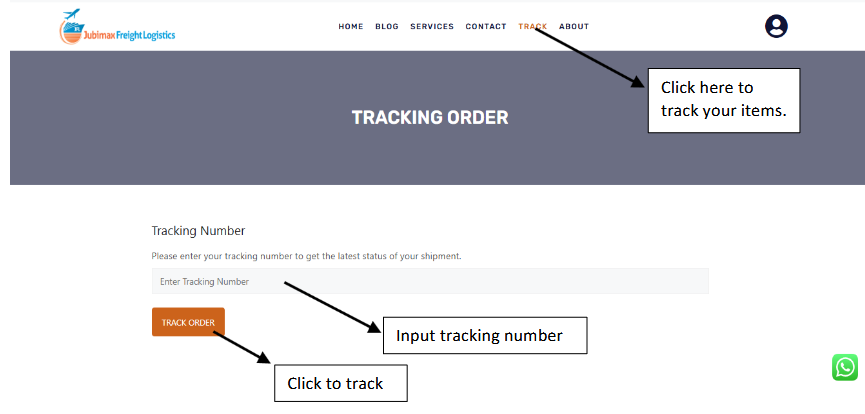
This tab helps to easily track your shipments in real time and stay updated on the status of your packages.
Even if you haven’t set up an account yet, you can still track your shipments with ease! Simply click on the “Track” tab at the top of the page to monitor your items in real time. Once you do, you’ll see an image as seen below…
ABOUT
Learn everything you need to know about JFL, our mission, vision, and values, as well as the range of services we offer to meet your shipping needs.
USER ICON
Allows you to access your JFL account.
SETTING UP YOUR ACCOUNT

- Click on the WhatsApp icon in the bottom-right corner of the page (Highlighted in red in the image above) to request an account setup.
- You will be asked to provide us with an email.
- That is all we need to set up an account for you.
Benefits of Setting Up an Account
- Access all your received items at the China warehouse without tracking them individually.
- View the status of all your shipments in one convenient place.
- Receive and manage your invoices with ease.
Create your account today for a smoother shipping experience.
HOW TO LOGIN
- Click on the user icon in the top right corner of your homepage.

- A new page will appear requesting your username or email and your password as seen below…
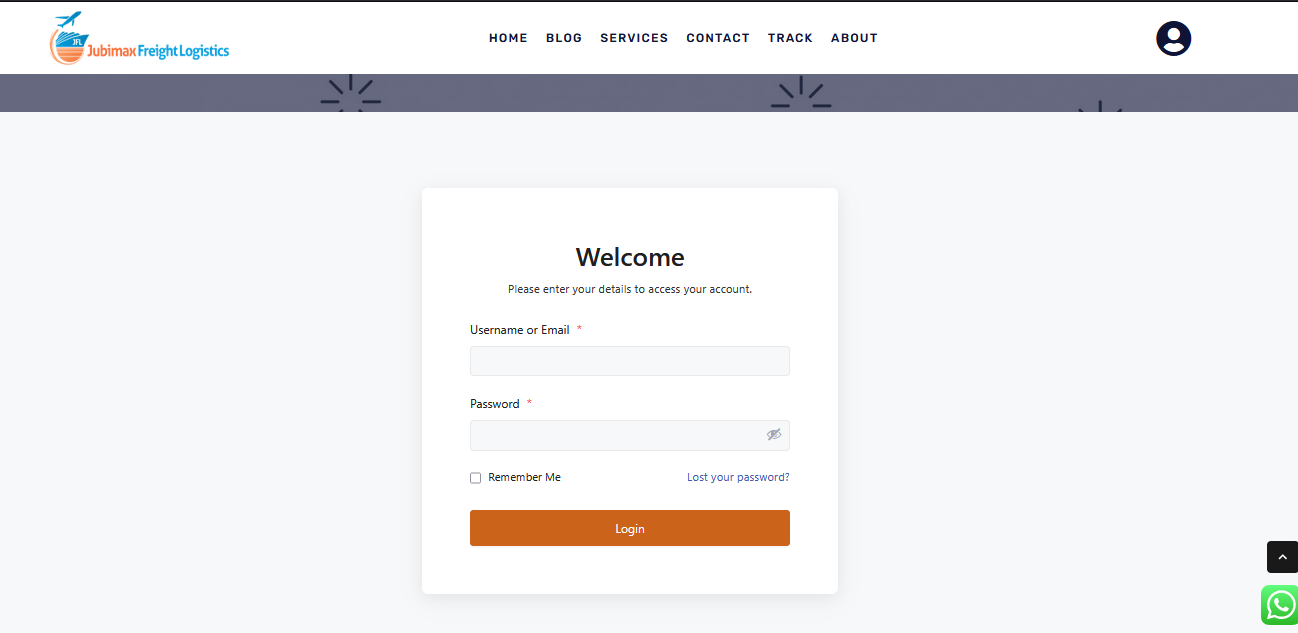
- Use the email you provided us as the “Username” (eg: abc@gmail.com) and your customer code as your default password. Kindly note that you can change your default password to your preferred choice after your account has been set for you.
- The customer code is usually given to you on your shipping mark. (eg: AC109). If you are not sure of your customer code, you can contact JFL via any of the contact means provided above for verification.
- This is how it should look…
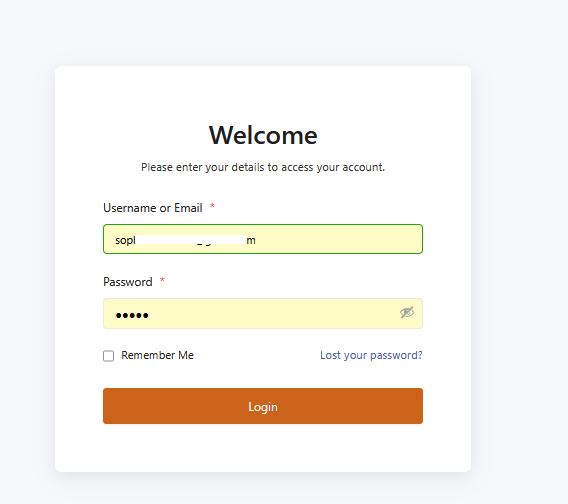
- After, click login to view your account. This is how your interface will appear…

This page introduces you to your dashboard, where you can see an overview of your shipments. On your dashboard, you’ll find:
- Profile: Your personal information, which you can edit to suit your preferences.
- Shipments: A summary of your total shipments, including those received at the China warehouse, those that have been shipped (left the country of origin), those ready for pickup, and those delivered to you.
- Invoices: Details of your total invoices, including paid, pending, and overdue payments.
- Calendar: A timeline displaying the estimated time of arrival (ETA) for your items.
Additionally, you can track your recent activities, monitor your monthly shipments, and stay updated on your invoices.
You can also view more about your packages by clicking the user icon. A dropdown menu as seen below should appear…
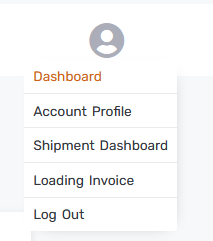
To view more details about your shipment, click “Shipment Dashboard”. This is what you see…
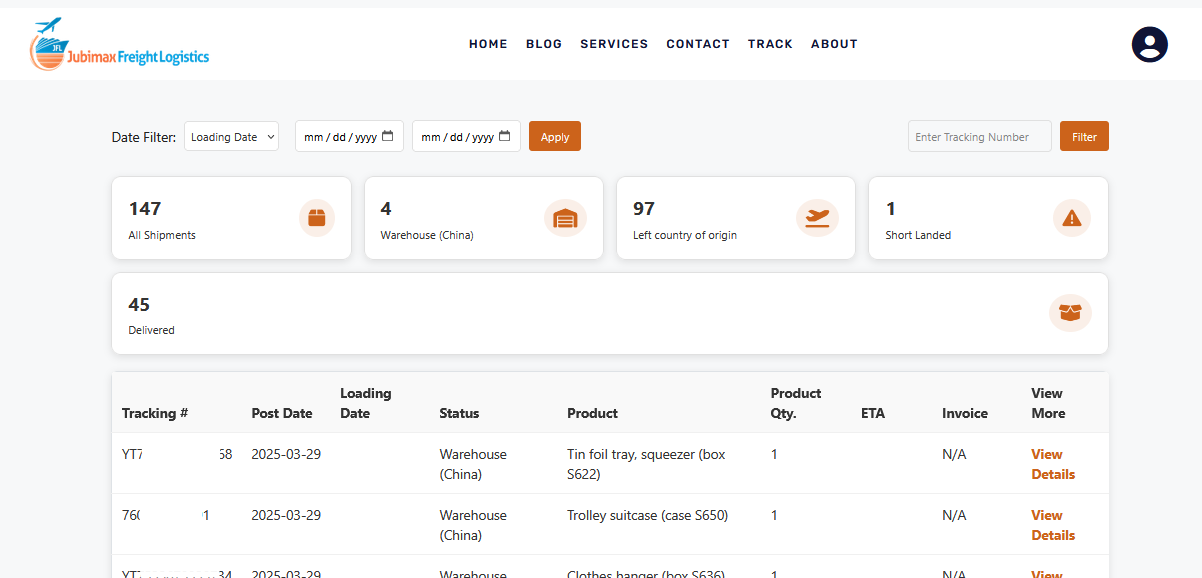
You can now view all your items received at the warehouse and their details. Below is a quick explanation of each column.
- Short Landed: These are items we expect to arrive in Ghana but do not. This happens when the item is not loaded into the container as expected.
- Tracking #: Indicates the tracking number of the item.
- Post Date: The date the item was received at the China warehouse.
- Loading Date: This is the date the item is loaded in the container.
- Status: Tells the location of the item in real-time.
- Product: The item name.
- Product Qty: The quantity of the item.
- ETA: The estimated time of arrival. This column is usually empty when the item has not been shipped (i.e., in the warehouse-china). It is updated once it has been shipped (left the country of origin). NB: The ETA may change depending on certain uncontrollable factors in shipping. They may come before the speculated ETA and may as well be delayed. You’ll receive updates every step of the way to keep you informed.
- Invoice: This allows you to view your invoice for the package.
- View More: This allows you to view more details of individual items.
To view more details about your invoices, click “Loading Invoice”. The image below represents what you should see…
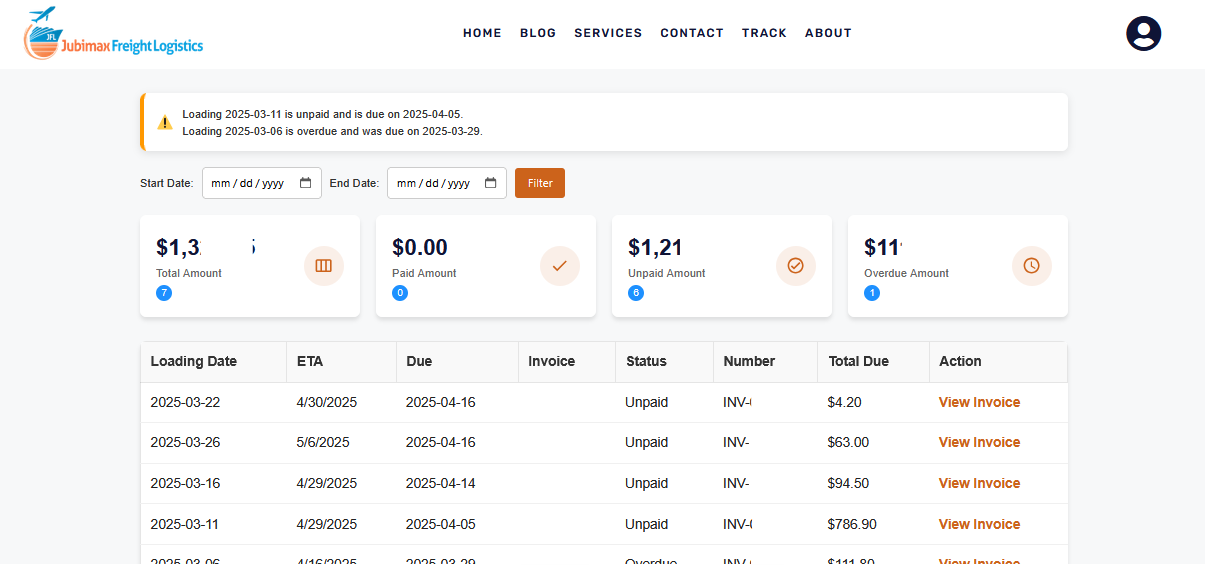
- Loading Date: Indicates the date the items were loaded.
- ETA: Displays the estimated time of arrival for your package.
- Due: Indicates the due date for making payment (payment after due date disqualifies you from enjoying discounted rates).
- Invoice: Customer Name.
- Status: Indicate paid, unpaid, or overdue invoices
- Number: Indicates the invoice number.
- Total Due: The total bill to pay per invoice in dollars.
- Action: Allows you to view more details on individual invoices
CONCLUSION
Whew! That was a lot, but definitely worth it! Follow these steps to navigate your dashboard smoothly. If you run into any issues, kindly feel free to reach out to us on 024 743 6599, we’re always happy to help!
FAQ:
Q: Why do I see “No results found” when I track my items?
A: This means your item has not yet been received in the warehouse.
Q: I heard you now send our invoices via mail, but I do not often visit my mail, how else can I receive my invoices?
A: You can still view your invoices on your dashboard after logging into your account. Your email is only needed for login.
NB: Please note that your invoice is not sent directly to your email. Instead, you’ll receive a link to access it within your account. Simply click the link, and you’ll be able to view your invoice right away.
Q: I’m not tech savvy. I might struggle with using this system.
A: No worries! Our system is very simple to use, and we’re here to help through every hurdle. Just follow the steps provided, and if you need extra support, JFL is always ready to assist. You’ve got this.
Q: How are Short Landed Items treated?
A: Once you confirm with us that your item has been received at our China warehouse, we take responsibility for it. Occasionally, an item may not arrive in Ghana as expected but could be included in a subsequent shipment. To ensure all possibilities are considered, we allow up to three shipments to check if the item arrives with later batches. During this period, we do not classify it as missing. If the item still hasn’t arrived after three shipments, we then treat it as a missing item and initiate a refund process. Terms and conditions apply.
_Kiki